
OpenVox Server: Intermediate CA
Before starting OpenVox Server for the first time, you need to initialize the CA. How you do that depends on whether you want OpenVox to manage your CA or whether you have an existing external CA.
OpenVox manages your CA:
Run puppetserver ca setup to generate an intermediate CA with all necessary certificates and keys.
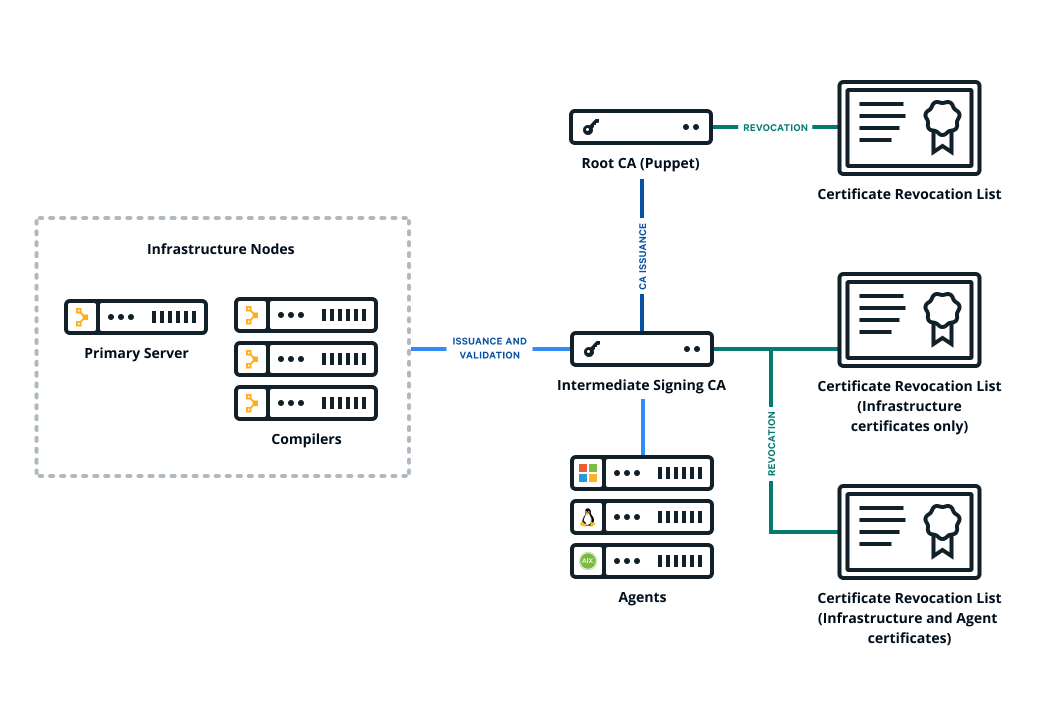
The following diagram shows the configuration of OpenVox’s basic certificate infrastructure.
You have an external certificate authority:
An external certificate authority is your organization’s own PKI infrastructure, managed
independently of OpenVox. Create a cert chain from it and use puppetserver ca import to
install the chain on your server.
OpenVox agents handle an intermediate CA out of the box — no need to copy files around by hand
or configure CRL checking.
If you skip both commands and start OpenVox Server directly, the server will generate a non-intermediate CA for backward compatibility. This configuration is not recommended for new deployments.
Where to set CA configuration
All CA configuration takes place in OpenVox’s config file. See the OpenVox Configuration Reference for details.
Set up OpenVox as an intermediate CA with an external root
OpenVox Server needs to present the full certificate chain to clients so the client can authenticate the server. You construct the certificate chain by concatenating the CA certificates within a PEM file, starting with the new intermediate CA certificate and descending to the root CA certificate.
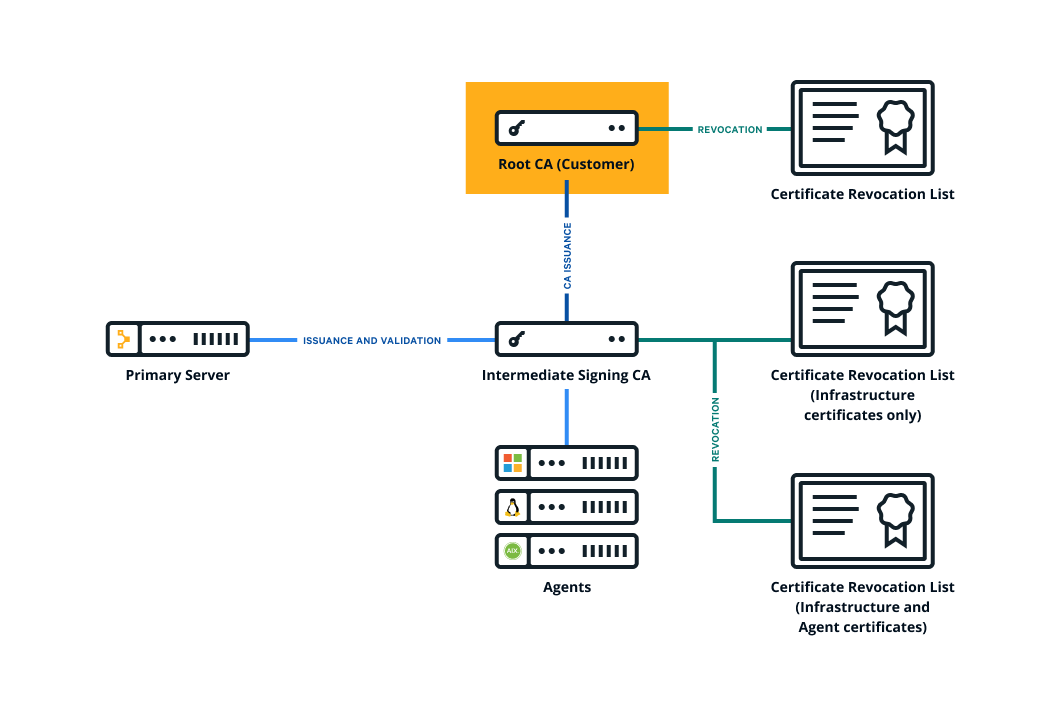
The following diagram shows the configuration of OpenVox’s certificate infrastructure with an external root.
To set up OpenVox as an intermediate CA with an external root:
- Collect your organization’s chain of trust. This includes:
- The root cert
- Any intermediate CA certs
- The CA cert that you will use to issue a CA signing cert for your OpenVox infrastructure
- Collect the corresponding CRLs for each of these certificates. Take note of the expiration dates of each CRL. When one expires, you need to refresh it for OpenVox to continue working.
- Create a private RSA key (minimum 2048-bit) with no passphrase for the OpenVox CA — you will need to
import it into your OpenVox infrastructure later.
puppetserver ca importrequires the key to be unencrypted. - Create a CSR for the OpenVox CA and sign it with SHA-256 using the appropriate cert from your
organization’s trust chain, which you gathered in Step 1. This is the new OpenVox CA cert, which will
be used to sign all other OpenVox infrastructure certs. The signed cert must have the following
extensions set:
basicConstraints: CA:TRUE(critical)keyUsage: keyCertSign, cRLSign(critical)subjectKeyIdentifier: hashauthorityKeyIdentifier: keyid:always
- Create a CRL for the new OpenVox CA cert.
-
Concatenate all of the certs into a PEM file, starting with the new OpenVox CA cert and ending with your organization’s root cert. The file should contain the PEM-encoded certs, like this:
-----BEGIN CERTIFICATE----- <OpenVox’s CA cert> -----END CERTIFICATE----- -----BEGIN CERTIFICATE----- <Org’s intermediate CA signing cert> -----END CERTIFICATE----- -----BEGIN CERTIFICATE----- <Org’s root CA cert> -----END CERTIFICATE----- -
Concatenate all of the CRLs into a PEM file, in the same order as the certificates. The file should contain the PEM-encoded CRLs, like this:
-----BEGIN X509 CRL----- <OpenVox’s CA CRL> -----END X509 CRL----- -----BEGIN X509 CRL----- <Org’s intermediate CA CRL> -----END X509 CRL----- -----BEGIN X509 CRL----- <Org’s root CA CRL> -----END X509 CRL----- -
Use the
puppetserver ca importcommand to trigger the rest of the CA setup:puppetserver ca import --cert-bundle ca-bundle.pem --crl-chain crls.pem --private-key openvox_ca_key.pem